You can read a word a hundred times and still not know whether you say it right. A pronunciation checker closes that gap: you say it out loud, and you get a score, not a guess.
In this article we'll cover:
- what a pronunciation checker can and cannot tell you
- how the GrammarMama pronunciation checker works, step by step
- what the colours and scores mean
- tips for getting a fair score
- how it compares with other ways to test your pronunciation
What a pronunciation checker does
A pronunciation checker listens to a recording of you saying a known word or sentence and compares it with how that text should sound. The result is a score, and a good checker also shows where the difference is.
That is different from voice typing or a speech-to-text test, which only show what the software understood. If the text comes out right, you cannot tell whether you were clear or just lucky. A checker that scores the speech itself tells you how close you were.
What it cannot do: it does not replace a teacher, it does not explain tongue and mouth positions, and it is not an exam. Treat the score as feedback that tells you what to repeat.
How the GrammarMama pronunciation checker works
The check is part of the practice routine for your own words, so you rehearse the words you actually want to use.
- Listen first. Each word comes with a Listen button that plays the correct pronunciation.
- Say the word. Hold the microphone button, say it, and let go.
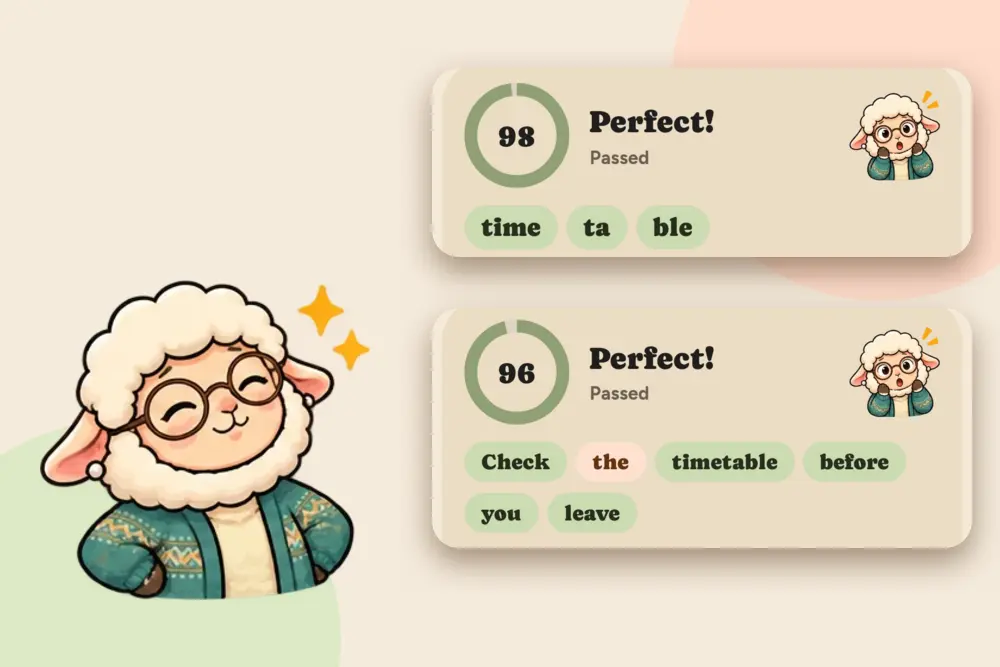
- See your score. You get an overall score from 0 to 100 and a verdict. For a single word, every syllable gets its own colour, such as time / ta / ble.
- Compare. Play back Your take and the Reference to hear the difference. Not happy? Try again.
- Say it in a sentence. After a pass, the app moves on to an example phrase that contains the word. Now every word in the sentence is coloured, so one weak word stands out.
- Move on. When the word and its phrase are done, you continue with the next word.
Beginners at the first levels also get a "Sounds like" line that spells the word the way your own language would read it, as a bridge until the sounds feel familiar.
What the colours mean
- Green: spot on
- Orange: close
- Brown: work on it
In the sentence "Check the timetable before you leave." the word the can show up orange while everything else is green: a small, fixable thing, and now you know which word to repeat. A passing score needs a good overall result and no single word that is clearly weak, so an average cannot hide one bad word.
Two places to practise
- In the app. Today's practice shows each new word, then its phrase, and scores both. Your own words come first.
- On the website. The Train pronunciation button on the vocabulary page runs a short session of up to 10 words: it plays the word, records you and scores you, and moves on after a clean pass. After three tries on a stubborn word it moves on, so you meet it again in a later session instead of grinding on it.
Both use the same word list, so words you added from a text, from the share sheet or with the Chrome extension are the ones you practise. How words get into the list is covered in Flashcards App That Makes the Cards for You.
Tips for a fair score
- Find a quiet spot. Background noise lowers the score for everyone.
- Hold the phone close, like a phone call, and keep the microphone button pressed until you finish speaking.
- Listen, then speak. Play the reference once before you try.
- Use a natural pace. Slowing down every syllable is not the same as saying it right.
- Repeat only the weak part. If one syllable or one word is orange or brown, say that part again, then the whole item.
How it compares
| Voice typing / speech-to-text test | An English speaking app (for example ELSA Speak) | GrammarMama | |
|---|---|---|---|
| What you get | The text it understood | AI feedback on your speech, lessons and AI role-play conversations | Score, a colour per syllable or word, retry and compare |
| Scores how close you were | No | Yes | Yes |
| Focus | Typing by voice | English speaking and pronunciation | Vocabulary, phrases and pronunciation in one routine |
| Your own words | Not applicable | Lessons and course material | Yes, words from texts you read |
| Languages | Many | English | English, German, French, Spanish, Italian, Portuguese, Greek |
| Cost | Usually free | Has a free plan; paid plans for more | Free to start with a daily limit; paid plans raise it |
If you want a dedicated English speaking coach with lessons and conversation practice, an app like ELSA Speak is built for that, and its site describes it that way. If you want pronunciation as part of learning your own words, with scores on the same word list, GrammarMama fits better. Many learners use one for each job.
Languages
The pronunciation check runs on the languages the app teaches: English, German, French, Spanish, Italian and Portuguese, plus Greek. The interface comes in ten languages, so you can practise English with a German, French or Spanish interface, for example. Greek scoring is coarser, because it compares what was heard with the expected words and does not rate individual sounds.
How to start
- Get the Android app or open the vocabulary page in your browser.
- Pick the language you are learning and add a few words.
- Start today's practice, hold the microphone button, say the word and read your score.
You can start for free. Scoring counts toward a daily limit that paid plans raise; see the pricing page for the current limits.
Key takeaways
- A pronunciation checker scores how your speech sounds, unlike voice typing, which only shows what it understood.
- GrammarMama gives an overall score, a colour for each syllable of a word, and a colour for each word in a sentence.
- Green is spot on, orange is close and brown needs work; you retry and compare with the reference.
- Quiet room, close microphone and natural pace give the fairest score.
- It does not replace a teacher; it shows you what to repeat. It needs an internet connection and an account.